New-article
Below, you can find information about content, language, external references, the review process, credits, and a step by step guide on how to contribute.
If you want to contribute a tutorial, you should also check out our tutorial template and our Markdown preview!
General Criteria
Content
-
Original
- You cannot re-submit any work that is published somewhere else on the web, even if you are the original author.
- You cannot submit any work that was primarily or entirely generated by AI.
- If you create a pull request for a tutorial that is not original, we will close this pull request and we will not publish the tutorial. In addition, we will not publish any other tutorials submitted by that user. This means that any future pull requests by that user will be closed without review.
-
Topic
- Before you start writing your tutorial, make sure there isn't already a tutorial at community.hetzner.com about the exact same topic.
- You might also want to check existing pull requests, just to be safe.
- Please do not include any logos/references to any Hetzner competitors.
-
Provide value
- The tutorial should provide value to the reader. Please do not just copy and paste commands and add one-line instructions. Instead, add some explanation where it's needed and provide some additional information if it's relevant.
- Please do not just write about a product or software itself. Usually, there is already official documentation with that same information. What you can do, however, is write a tutorial to explain how to use a certain product or software in a specific environment.
Language
-
English
- If you're fluent in another language, and are able to make a translation, you can submit your tutorial in multiple languages, as long as at least one of them is English.
We support the following languages: Englishen, Germande, Russianru, Italianit, Bulgarianbg, Finnishfi, and Portuguesept - If you're not fluent in English, but you have a great tutorial to share in a different language, please reach out to us. We are open to possibly making exceptions for specific tutorials.
- If you're fluent in another language, and are able to make a translation, you can submit your tutorial in multiple languages, as long as at least one of them is English.
-
Easy to understand
- These tutorials will be read by users with a wide range of experience. Make sure beginners can still follow what is being done. This means it is important not to skip any steps, no matter how obvious or self-explanatory they may seem. Feel free to include screenshots to show exactly what the user should be seeing.
- If you use acronyms, make sure to write them out the first time you use them.
- Don't use excessive jargon or techspeak. Again, if you do use a word that not everybody might understand, either explain it, or use an easier to understand word or phrase.
- Jokes are allowed, but don't overdo it.
External references
-
Free and open source
- If your tutorial includes products or software of a third party, make sure they are free-of-charge and open-source, so that everyone can follow your tutorial.
-
Links, Docker images, Terraform modules
- If you want to add a link in your tutorial, please make sure it takes the reader to an official and trusted website.
- If you want to use a Docker image or a Terraform module in your tutorial, make sure it is a trusted one. This means that you should not use a Docker image with only 12 downloads, for example.
-
External repositories
- Your tutorial should not include links to or content of small external repositories. The reason for this is that we at Hetzner cannot control any changes or deletions made to those small external repositories. As a result, the submitted tutorial might not work anymore.
Review process
-
After you create your pull request, one of the Community Managers will evaluate your tutorial and provide you with feedback.
-
Depending on the feedback, you might need to update your tutorial.
If you don't respond to the feedback provided by the Community Manager and you stop working on the tutorial, the pull request will be marked as
stale. If you start working on the tutorial again, we will remove that label. If the tutorial remains without activity for a long period of time, we will close the pull request. Should you find time again to continue working on the tutorial, you are welcome to open a new pull request. -
Once the Community Manager has no more feedback and the tutorial looks good, the Community Manager will add the
readylabel to your pull request. -
Someone will then do a final check for spelling or formatting mistakes and publish the tutorial.
If your tutorial is accepted, you will receive an email from a Hetzner Community Manager. Please respond to this email and provide your Hetzner Account number, so the reward can be added as a credit to your account.
Credits
-
New tutorials
- New tutorials are rewarded with up to €50 credit. The final amount depends on how detailed and in-depth the tutorial is.
-
Updates
- Minor updates are not rewarded with a credit.
- Major updates are rewarded with about €10 credit.
-
Requirements
- In order to receive credits, you need at least one invoice in your Hetzner account.
Updates
Since you know your tutorial best, it would be great if you could help us keep your tutorial up-to-date.
-
Issues
If someone opens an issue related to your tutorial, we might mention you in it so that you can take a look at it. You can then check whether you'd be interested in helping to solve the issue, or in updating your tutorial if necessary.
How to contribute step by step
-
Fork and clone the project
-
Add a folder for your tutorial
cd community-content
mkdir tutorials/my-tutorial-name
Change
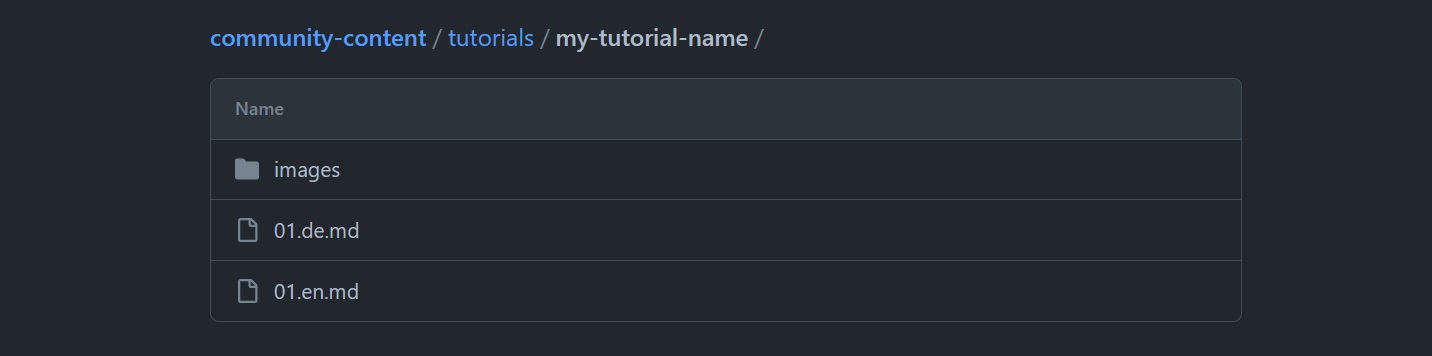
my-tutorial-nameto a unique name. You will have to specify this folder name in the metadata of your tutorial.Each tutorial has its own folder. This folder contains everything that is part of the tutorial. If you use images, create a separate folder called
imageswithin yourmy-tutorial-namefolder. You will also need one file called01.en.mdwhich contains the tutorial in English language. If you want to add a second language, you will have to add a second file.Here is an example of a tutorial that is available in English and German. It also includes some images.
-
Use the template
To help you get started, we've prepared a tutorial template that you can build on. It includes a basic layout for your tutorial, some examples of formatting, and a number of tips and tricks for setting everything up. You can copy the content of this file to your own tutorial and edit it where needed.
If you already have a file called
01.en.md, this command will overwrite the content of that file.cp tutorial-template.md tutorials/my-tutorial-name/01.en.mdThe tutorials at community.hetzner.com are all written using Markdown. This is a markup language used all over the web. You can find a great overview on GitHub: Markdown-Cheatsheet
The title you add at the top in
title: "<your-title>"will automatically be added as a H1 headline at the beginning of your tutorial, so you do not need to add the title again below the metadata yourself. Instead, you can start directly with your introduction.--- SPDX-License-Identifier: MIT path: "/tutorials/my-tutorial-name" slug: "my-tutorial-name" title: "Installing <software> on Ubuntu" short_description: "This description should be less than 160 characters." ... --- ## IntroductionApart from the title, all other headers should be H2. If there are two or more smaller steps within a larger step, you can consider making those smaller steps H3. For specific examples of how to format a tutorial, please take a look at the tutorial template.
When you edit the tutorial template, you should also note the following:
- If your tutorial requires a server, the instructions should work on a new server.
- If a user just ordered a server, they should be able to follow the tutorial step by step, without having to install or configure anything first. If there are prerequisites for your tutorial, though, please make sure there is already a tutorial explaining that. You should then link this tutorial at the beginning of your own tutorial.
Tutorial metadata
* **"title"** * The title should make clear what the goal of your tutorial is. Don't stuff everything into the title, though; it should be a summary that gives users an immediate idea of what the tutorial is about. e.g. "Installing `Or other labels ------
Prerequisites
**Server**-
Write the content
When you write your content, make sure it meets the General Criteria presented at the top.
You can use our Markdown preview to see how your tutorial will look after it was published and to check your text for any formatting mistakes.
Also make sure that your tutorial includes the license block at the bottom of the tutorial file. And remember to replace
[submitter's name and email address here]with your own name and email address. -
Commit and push your tutorial
Create a git branch for your tutorial:
git checkout -b my-tutorialReplace
my-tutorialwith a short name that describes your tutorial.Commit your changes to the new branch and push your tutorial to GitHub.
-
Create a pull request
Create a new pull request on GitHub. In your pull request, you should include the following statement:
I have read and understood the Contributor's Certificate of Origin available at the end of
https://raw.githubusercontent.com/hetzneronline/community-content/master/tutorial-template.md
and I hereby certify that I meet the contribution criteria described in it.
Signed-off-by: YOUR NAME <YOUR@EMAILPROVIDER.TLD>
One of the Community Managers will evaluate your tutorial and provide you with feedback. If everything is fine, we will publish your tutorial.